Getting Started with Subtimizer
1. Overview
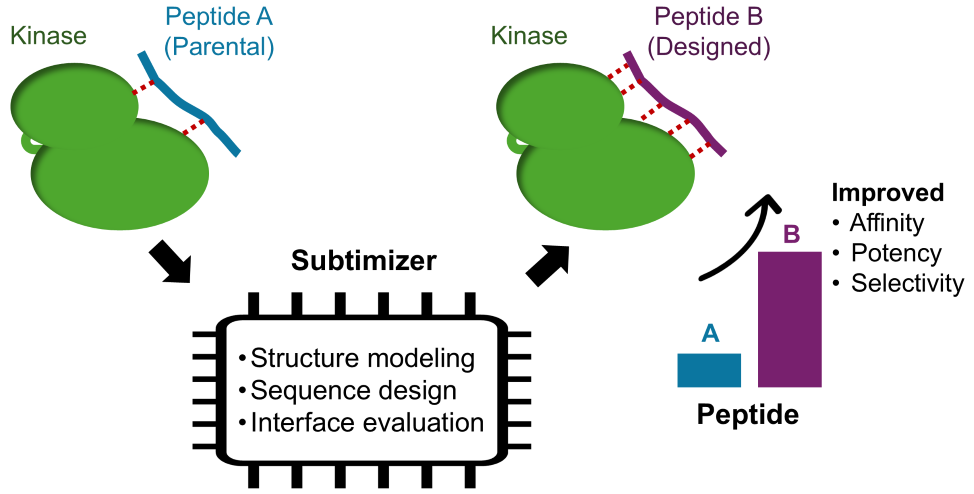
Subtimizer is a computational workflow for structure-guided design of potent and selective kinase peptide substrates. It integrates three state-of-the-art tools — AlphaFold-Multimer for structural modeling, ProteinMPNN for sequence design, and AlphaFold2-based interface evaluation — into an end-to-end pipeline for substrate engineering. The workflow automates SLURM job submission, sequence analysis, clustering, and validation, enabling high-throughput design and assessment of candidate substrates on HPC systems.
2. Prerequisites
Before installing Subtimizer, ensure that the following dependencies are available on your HPC system:
- Anaconda, Miniconda, or Mamba — for conda environment management
- ColabFold (with AlphaFold-Multimer support) — must be installed and added to
$PATH - ProteinMPNN — install and set the
MPNN_PATHenvironment variable to its directory - af2_initial_guess (from dl_binder_design) — install and set the
DL_BINDER_DESIGN_PATHenvironment variable - SLURM-based HPC environment — for job scheduling and parallel execution
MPNN_PATH and DL_BINDER_DESIGN_PATH in your ~/.bashrc or equivalent shell configuration file so they are available in all sessions.3. Installation
3.1. Create Conda Environments
Subtimizer requires separate conda environments to prevent dependency conflicts between AlphaFold and ProteinMPNN. First, create and activate the main subtimizer_env environment:
Step 1: Create and activate the main environment:
|
|
Step 2: Create the worker environments from the YAML files included in the repository:
|
|
af2_des_env.yaml and mpnn_des_env.yaml files are included in the Subtimizer GitHub repository. Clone the repo first if installing from PyPI to access these files.3.2. Install Subtimizer
With the subtimizer_env environment active, install Subtimizer either from PyPI (recommended) or directly from the source repository:
Option A: Install from PyPI (recommended)
|
|
Option B: Install from source
|
|
Verify the installation:
|
|
4. Configuration
Subtimizer uses SLURM job templates to submit tasks to your HPC cluster. The default templates embedded in the package may use partition names, memory settings, or module load commands that differ from your cluster's configuration. To customize these, initialize local template files in your project directory:
|
|
This creates a subtimizer_templates/ directory with editable SLURM job scripts. Edit the partition names, memory allocations, and module requirements in these files to match your HPC environment. Subtimizer will use local templates from this directory in preference to the built-in defaults.
subtimizer init-templates once from your project working directory. The templates are plain shell scripts — edit them with any text editor to match your cluster's scheduler configuration.5. Usage
The Subtimizer workflow proceeds in twelve sequential steps, from initial structural modeling of the kinase–substrate complex through ProteinMPNN sequence design, clustering, and final validation. A list of complexes (one per line) is provided to each command via the --file flag. Most commands also accept --start and --end to process a subset of the list, and --max-jobs to control concurrency.
-n, --max-jobs <int>— Maximum number of concurrent SLURM jobs (default: 4)--start <int> / --end <int>— Process a subset of the input list by line index--mode parallel— Submit jobs for parallel execution on multi-GPU nodes
Step 1: Setup Project Structure
Initialize the project directory structure for your list of complexes:
|
|
Step 2: Fold with AlphaFold-Multimer
Run AlphaFold-Multimer structural predictions for the kinase–substrate complexes. Two modes are available:
Batch mode (one job per complex, up to --max-jobs running simultaneously):
|
|
Parallel mode (all complexes in a single multi-GPU SLURM job):
|
|
Step 3: Design with ProteinMPNN
Set up ProteinMPNN input files, then run sequence design on the predicted structures:
|
|
Step 4: Analyze Results
Parse and summarize the ProteinMPNN design outputs:
|
|
Step 5: Cluster Sequences
Cluster the designed sequences to identify a diverse set of candidate substrates for downstream validation:
|
|
Step 6: Prepare for Validation Folding
Prepare input files for folding the clustered (designed) sequences:
|
|
Step 7: Fold Designed Sequences
Run AlphaFold-Multimer on the designed sequences for structural validation:
|
|
Step 8: Fix PDBs
Renumber and clean up the output PDB files for downstream validation:
|
|
Step 9: Validate with AF2 Initial Guess
Validate the designed sequences using the AF2 initial guess methodology:
|
|
Replace /path/to/predict.py with the full path to the predict.py script from your dl_binder_design (af2_initial_guess) installation.
Step 10: Generate Reports
Generate summary reports and interface metrics for the designed sequences:
|
|
Step 11: Parental Substrate Processing
Process and validate the original (parental) substrate for comparison with the designed sequences. This establishes a baseline for evaluating the improvement achieved by the designed candidates.
|
|
Then generate the final combined report comparing designed and parental substrates:
|
|
Step 12: ipSAE Evaluation (Optional)
ipSAE provides an additional interface quality metric based on predicted aligned error (PAE). This step is optional but recommended for a comprehensive evaluation of the designed substrates.
First, download ipSAE and add it to your $PATH:
|
|
Then run the ipSAE evaluation:
|
|
--pae-cutoff 15 and --dist-cutoff 15. Adjust these as needed for your target system.6. Citation
If you use Subtimizer in your research, please cite:
Yekeen A.A., Meyer C.J., McCoy M., Posner B., Westover K.D. Subtimizer: Computational Workflow for Structure-Guided Design of Potent and Selective Kinase Peptide Substrates. Journal of Chemical Information and Modeling (2026). GitHub .
I try my best to make the information on this website as accurate as possible, but if you find any errors in the contents of this page or any other page on this website, kindly get in touch with me at contact[at]abeebyekeen[dot]com.
Also, you are welcome to reach out for assistance and collaboration.